 ZwayRank
What is a Good Click-Through Rate (CTR) in Google Search Console for My Industry?
You check Google Search Console, see your Click-Through Rate (CTR) data, but then what? Is your performance good, average, or poor? The truth is, "good" is relative. It depends on your ranking, the type of search query, and most importantly, your industry. This page gives you the benchmarks to understand your performance, set realistic goals, and show your stakeholders the real impact of your SEO work.
Why Does My Organic CTR Matter More Than Ever?
Your organic CTR is a direct measure of how well your page's title and description grab a searcher's attention. Think of it as your first impression in the search results. While Google says CTR isn't a direct ranking factor, a high CTR often leads to positive user signals. If users click your result, stay on your page, and don't immediately bounce back to Google, that tells Google your result is relevant. This can indirectly influence your rankings over time. More directly, a higher CTR means more traffic to your site from the same number of impressions. If you have 10,000 impressions and a 2% CTR, you get 200 clicks. Increasing that to just 3% gets you 300 clicks, a 50% increase in traffic without any change in ranking.
What Are the Average Organic CTR Benchmarks by Industry?
Here are the average organic CTR benchmarks for 2023, based on a recent study. These numbers give you a starting point to compare your own performance. Remember, these are averages, and your specific results will vary.
| Industry | Average CTR (Top 3 Positions) | Average CTR (Positions 4-10) |
|---|---|---|
| B2B/SaaS | 4.5% | 1.8% |
| E-commerce (Fashion) | 6.2% | 2.5% |
| E-commerce (Electronics) | 5.1% | 2.1% |
| Finance/Insurance | 3.8% | 1.5% |
| Healthcare/Medical | 4.0% | 1.6% |
| Legal | 3.5% | 1.3% |
| Real Estate | 5.5% | 2.8% |
| Travel & Hospitality | 6.5% | 3.1% |
| News & Media | 7.0% | 3.5% |
(Source: 2023 CTR Study by Sistrix, "CTR Study 2023: The new average click-through rates on Google")
How Do Different Types of Search Queries Affect CTR?
Not all search queries are created equal. The user's intent behind a search significantly impacts the expected CTR.
- Branded Queries (e.g., "ZwayRank login"): These queries often have the highest CTR, sometimes 30% or more. Users already know your brand and are specifically looking for you.
- Navigational Queries (e.g., "twitter"): Similar to branded queries, these have a high CTR for the intended destination. Users want to go to a specific website.
- Informational Queries (e.g., "what is ctr"): CTRs tend to be lower here because users are often researching. They might browse several results to gather information, comparing headlines and descriptions before clicking.
- Transactional Queries (e.g., "buy seo software"): These can have medium to high CTRs. Users are ready to buy, but competition is fierce, and ad placements can push organic results down, affecting visibility.
How Can I Find My Own Website's Average CTR?
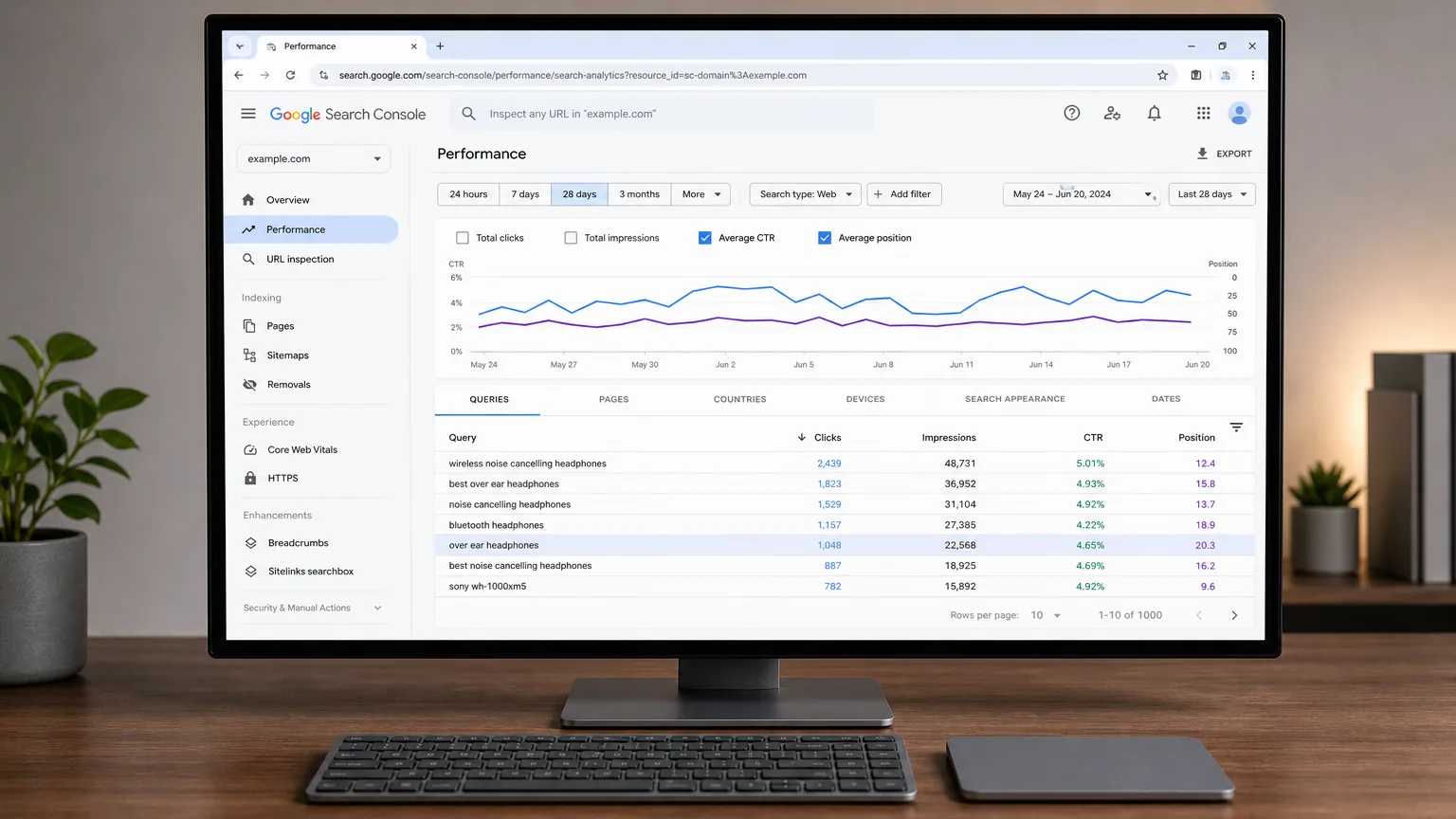
Finding your own CTR data in Google Search Console is straightforward. Here’s how:
- Log in to Google Search Console.
- Go to the 'Performance' report in the left-hand navigation.
- Ensure the 'Average CTR' and 'Average position' boxes are checked above the graph.
- Filter by date range, for example, 'Last 3 months' for a good overview.
- The main chart will show your total impressions, clicks, average CTR, and average position. Below the chart, you'll see a table with individual query data, where you can sort by CTR or position to identify opportunities.
What Practical Steps Can I Take to Improve My Organic CTR?
Improving your CTR is about making your search result more appealing and relevant to searchers. Here are actionable steps:
- Optimize Page Titles: Your title is the first thing searchers see. Make it compelling. Use numbers (e.g., "7 Ways to Boost CTR"), brackets (e.g., "[Guide]"), dates (e.g., "2024 Guide"), and power words like "Ultimate," "Free," "Proven," or "Secret." Most importantly, ensure your title accurately reflects the page's content and matches the primary keyword and search intent.
- Refine Meta Descriptions: Treat your meta description as ad copy. It's your chance to sell the click. Include a clear call-to-action (e.g., "Learn more," "Get your free guide") and naturally incorporate your target keyword. Answer the user's implicit question directly and briefly.
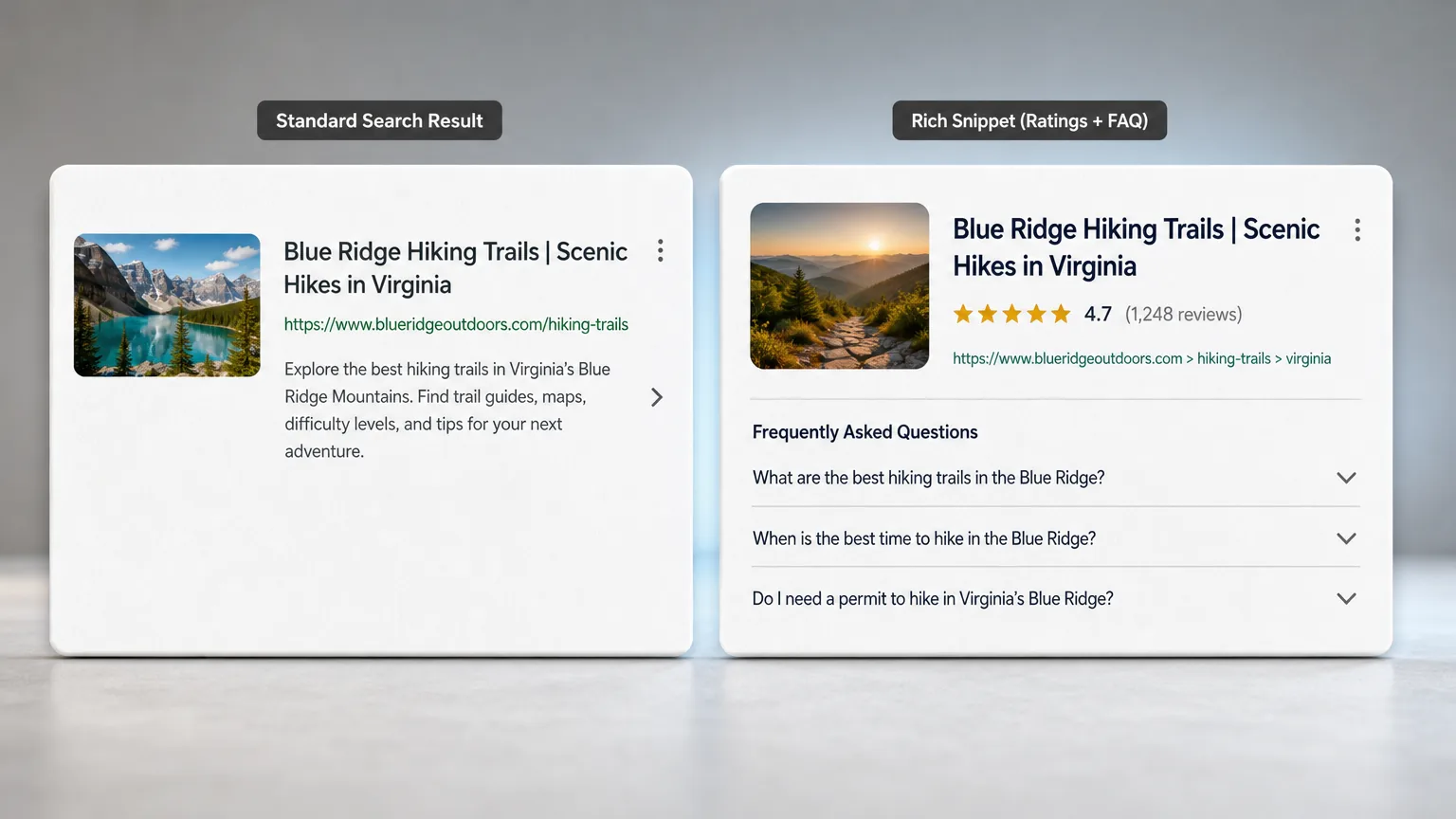
- Use Structured Data (Schema): Schema markup helps Google understand your content better and can lead to rich snippets. Rich snippets, like star ratings, FAQ dropdowns, or how-to steps, take up more space in the SERP and visually stand out. This extra visibility can significantly boost your CTR. For example, a result with star ratings looks much more authoritative and clickable than one without.
- Analyze the SERP: Before you optimize, Google your target query. What do the top results look like? Are there featured snippets, People Also Ask (PAA) boxes, or video carousels? Adapt your content format and title to fit what's already winning for that specific search intent. If Google is showing a listicle in the featured snippet, consider structuring your content similarly.
Improving your CTR is a continuous process of testing and refinement. By understanding your industry benchmarks and applying these strategies, you can drive more qualified traffic to your site from your existing rankings.
Start your free 7-day trial or book a demo to see how your brand appears in AI answers.
The first scan is free: what ChatGPT, Gemini and Claude say about you, where Google ranks you, and what the crew would do first.
Start free for 7 days